



Java programmer expert


A Java Stack is one of a number of data structures (collections) for easier data manipulation. As part of our series on data structures, we’ll introduce each structure, review its uses, available methods, advantages and disadvantages, and provide tips for when it’s appropriate to use it.

V článku sa dozvieš:
In this section, we will discuss the collection that represents the stack – the Java Stack.
The Stack collection is implemented as a class in the java.util package. It is a descendant of the Vector class, from which it takes its properties and also adds features specific to stack data access.
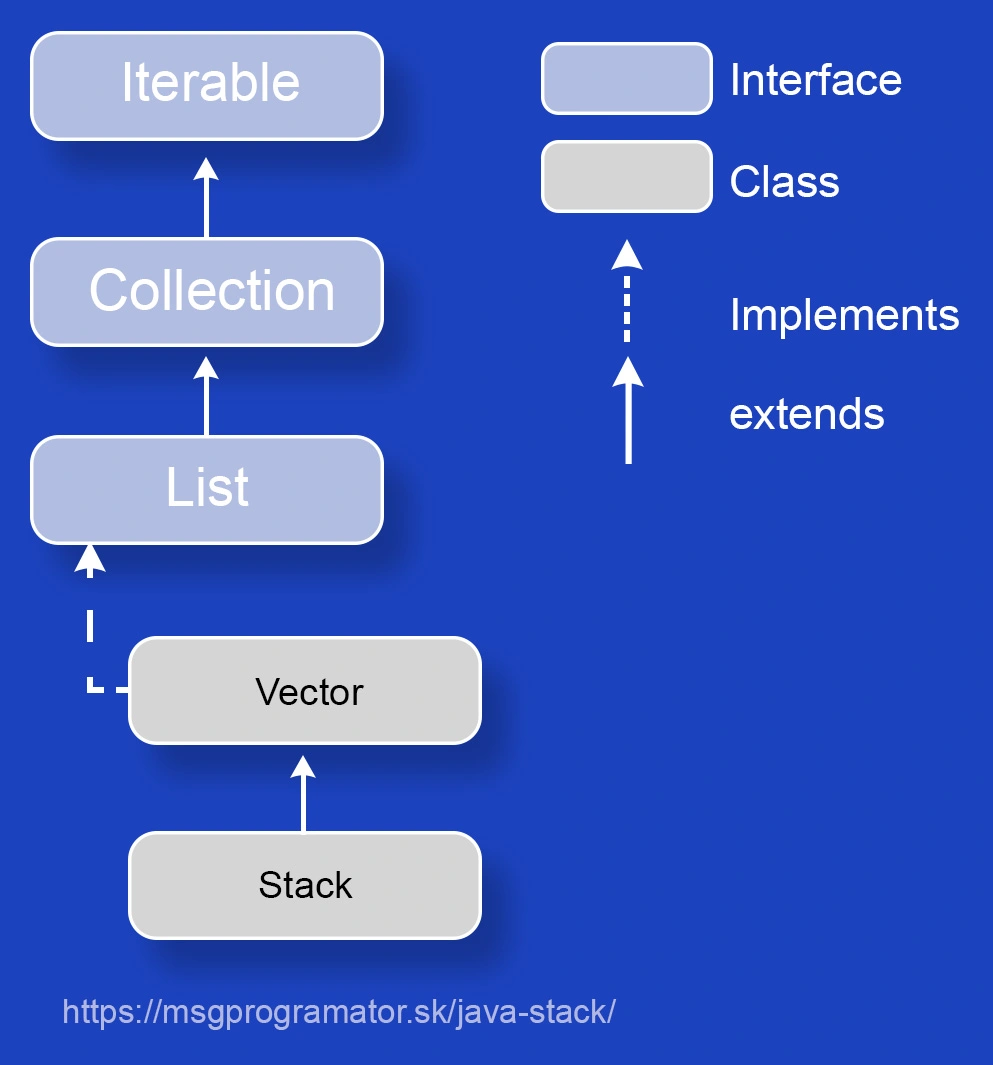
The Stack class incorporates the LIFO (Last In, First Out) principle, which means that the last element added is also the first one removed from the stack. This algorithm is useful in situations where we need to keep the order of operations (for example, when computing expressions or implementing recursion) and works in constant time.
A typical example of using Stack is the Stack trace when debugging code. The last visited method is added last to the top of the stack, and when it is exited, it is removed from the stack and the method that called the previous method is on top of the stack.
Although Stack class is built on top of the Vector class and inherits its dynamic behavior (automatic capacity increase), it is a structure that is currently less used in modern applications because the Deque interface and its implementations such as ArrayDeque from java.util can completely replace Stack with its implementation of the LIFO approach and a complete and consistent set of operations.
The Stack class provides a single simple constructor that creates an empty stack. The capacity of the stack is initially set to a fixed value of 10, and like a vector, it doubles in size when the total size of the stack is exceeded. The difference with the vector is that it never shrinks once elements are removed from the stack.
Empty stack
Creates an empty stack with a capacity of 10 (default value).
Basic operations with the Stack collection include:
Adds a new element to the top of the stack.
Removes and returns the top element. If this operation is called on an empty stack, throws an exception EmptyStackException.
Returns the top element without removing it.
Returns true if the stack contains no elements, false otherwise.
Searches for an element and returns its distance from the top of the stack. The distance of the topmost element is 1. The one below it is 2, and so on. If the element is not found, it returns -1.
Adding elements to the stack can be done one element at a time or in bulk.
Adding one element
stack.push(1);Adding multiple elements at once
List<Integer> values = Arrays.asList(2, 3, 4, 5);
stack.addAll(values);If we want to see which element is currently at the top of the stack we use the peek() method.
Information about the top element
stack.peek();In our example, it returns the value 5.
If we are interested in whether the stack contains any elements at all, we can call the empty() method.
stack.empty();In our example, it will return false as it contains elements.
If we want to find out if the stack contains a particular element X, we can call the search(X) method.
stack.search(X);stack.search(7) => returns -1
stack.search(2) => returns 4
Most often we need to remove the top element of the stack – we do this by calling the pop() method. However, operations from the Vector class offer us other possibilities.
Removing and returning the top element
In our example, it removes the top element from the stack (5) and stores it in a variable element. The top of the stack will contain the current element 4.
Integer element = stack.pop();Clearing the stack
There are two equivalent methods to clear all stack elements: clear(), removeAllElements().
stack.removeAllElements();
stack.clear();I will mention a few other useful methods.
Removing elements using a filter (lambda expression)
stack.removeIf(elem -> elem < 2);Detecting the number of elements in the stack
int size = stack.size();Index of occurrence of the element closest to the top of the stack
stack.lastIndexOf(3);A complete overview of all available methods for Stack can be found here – Stack class documentation.
The use of the Stack collection is useful in situations where it is necessary to implement algorithms based on the LIFO principle, e.g. in graph traversal,backtracking, can be used in text editors to implement undo and redo operations, manage web browser history and navigate back/forward, etc.
It can also be used as a synchronized collection in a multi-threaded application where multiple threads are working with the same stack, or used in older applications that use synchronized data structures but still run on an outdated version of Java.
Now that we know the basic methods for the Stack collection, we can play around with them a bit in the following program, which demonstrates the use of the stack to evaluate expressions using Reverse Polish Notation (RPN).
Main.java
import java.util.Arrays;
import java.util.Stack;

public class Main {
    public static void main(String[] args) {
        String[] expression = {"2", "3", "+", "4", "*"};
        evaluateRPN(expression);
    }

    public static void evaluateRPN(String[] tokens) {
        Stack<Integer> stack = new Stack<>();
        System.out.println("Je zasobnik prazdny? " + stack.empty());
        System.out.println("Vypocet RPN pre vyraz: " + Arrays.toString(tokens));

        for (String token : tokens) {
            if ("+-*/".contains(token)) {
                System.out.println("Vrchny prvok (peek): " + stack.peek());
                int b = stack.pop();
                System.out.println("Odstraneny pravy operand (pop): " + b);

                int a = stack.pop();
                System.out.println("Odstraneny lavy operand (pop): " + a);
                System.out.println("Operacia: " + token);
                switch (token) {
                    case "+" -> stack.push(a + b);
                    case "-" -> stack.push(a - b);
                    case "*" -> stack.push(a * b);
                    case "/" -> stack.push(a / b);
                }

                int topValue = stack.peek();
                System.out.println("Pridany vysledok (push): " + topValue);
            } else {
                stack.push(Integer.parseInt(token));
                System.out.println("Pridany prvok (push): " + token + " -> " + stack);
            }
        }

        System.out.println("Je zasobnik prazdny? " + stack.empty());
        System.out.println("Hladanie (vzdialenosti) prvku 10 (search): " + stack.search(10));
        System.out.println("Hladanie (vzdialenosti) prvku 20 (search): " + stack.search(20));
        System.out.println("Konecny vysledok (pop): " + stack.pop());
        System.out.println("Je zasobnik prazdny? " + stack.empty());
    }
}
The output of this example is:
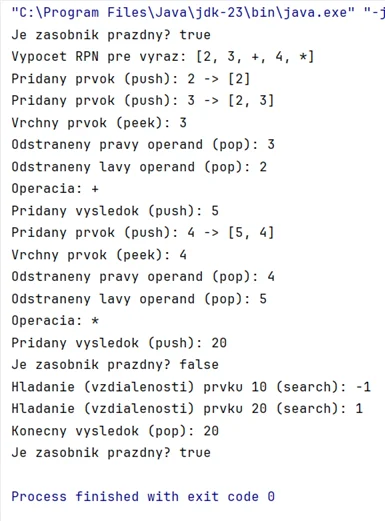
We have prepared the files with the above example in the form of code that you can run directly in Java:
Download the Stack code example in Java.

Related articles