



Java programmer expert


As part of our series on data structures (collections), we introduce Java Vector for easier data manipulation. As part of our series on data structures, we’ll introduce each structure, collection, and class by showing their uses, available methods, advantages and disadvantages, and providing tips on when to use them.

V článku sa dozvieš:
In today’s section, we will focus on a collection that represents a dynamic array of objects and can increase or decrease its size according to the needs of the application – Vector.
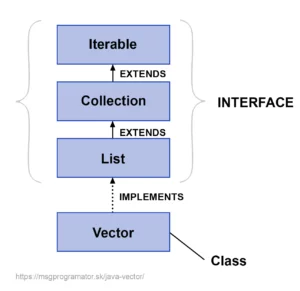
Programmers often work with static or dynamic arrays. However, these are fixed and can only store a predetermined number of elements. If the storage capacity of an array is exceeded, we most often have to create a new array – much larger, copy the elements from the old array into it, and delete the old array so that it doesn’t take up memory space unnecessarily.
And this is what the Vector collection, which automates the whole process in the background, does away with from the programmer’s point of view. Vector is flexibly enlarged when more elements are added to it than its current capacity. If it runs out of capacity to store new elements, the new capacity is calculated as twice the old capacity (assuming the programmer doesn’t set a custom capacityIncrement increment).
What is also interesting about this dynamic list is that it can contain objects of different data types.
The Vector class was introduced in Java 1.2 and is found in the java.util package. Although it is currently less used than the similar ArrayList collection, directly in its implementation Vector is synchronized, that is, only one thread can access a given area at a time, while other threads must wait. This feature makes it particularly suitable for use in multithreaded applications.
To create a Vector instance, we can use one of four constructors.
1. Creates an empty vector with capacity 10 (default value)
Vector<E> vector = new Vector<E>();2. Empty vector with initial capacity size
Vector<E> vector = new Vector<E>(int size);3. Empty vector with initial capacity size and increment capacityIncrement
The capacity is incremented by capacityIncrement when the current capacity is exceeded.
Vector<E> vector = new Vector<E>(int size, int capacityIncrement);4. Vector constructed using collection
Initializes the vector with elements from the given collection.
Vector<E> vector = new Vector<E>(Collection<E> collection);The basic operations with the Vektor collection include:
Adding elements to the vector can be done individually or in bulk.
Adding one element
vector.add("Have");Adding multiple elements at once
vector.addAll(List.of("a", "wonderful", "day"));Inserting an element on the index
vector.add(1, "all");We can update the element using the index using the set() method. This also returns the original element.
vector.set(3, "year");
vector.set(1, "successful");
We can remove elements based on their index or by value. Only the first occurrence of an item is always deleted.
Removal by value
vector.remove("a");Delete an element by its index
vector.remove(1);All elements to the right of the removed element are moved one position to the left.
Removal of all elements
vector.removeAll();
To get an element of a vector at a particular index, call the get() method.
String firstElement = vector.get(0);If we provide the get method with an index outside the range of the vector we get an ArrayIndexOutOfBoundsException.
Using a for loop
for (int i = 0; i < vector.size(); i++) {
    System.out.println(vector.get(i));
}
Using for-each
for (String element : vector) {
    System.out.println(element);
}If we are interested in whether an element already exists in the vector we can use the contains() call.
boolean contains = vector.contains("Have");In the same way we can get the index of an element, i.e. its position in the vector.
int index = vector.indexOf("year");If the method returns -1, the element was not found in the vector.
If we need to sort a vector, we can do so using the sort() method, which expects a Comparator object as input. At this point it is important to mention that the sorting algorithm does not guarantee stability, that is, it does not preserve the relative order of the same elements on the input.
vector.sort(Comparator.naturalOrder());I will mention a few other useful methods.
Copy to array
Object[] array = vector.toArray();Deleting all elements
vector.clear();Determination of capacity and vector size
int capacity = vector.capacity();
int size = vector.size();
Index of the last occurrence of the element
vector.lastIndexOf("year");For a complete overview of all available methods for Vector see Oracle.
The Vector data structure can be used if we need a scalable collection according to the number of elements we are inserting, but we don’t know the exact number of elements. It can also be used as a synchronized collection in a multi-threaded application where multiple threads write data to the same structure.
For modern applications, we recommend using ArrayList together with manual synchronization (e.g. using Collections.synchronizedList) to ensure consistency and correctness of data during parallel processing.
Now that we know the basic methods for the Vector collection, we can play around with them a bit in the following program that dynamically modifies a group of strings. First, we create one string and then transform it into another using the methods we’ve learned.
import java.util.List;
import java.util.Vector;

public class Main {
    public static void main(String[] args) {
        Vector<String> vector = new Vector<>();
        vector.add("Have");
        vector.addAll(List.of("a", "wonderful", "day"));
        System.out.println(String.join(" ", vector));
        vector.set(0, "Happy");
        vector.remove("a");
        vector.set(1, "new");
        vector.set(2, "year");
        vector.add("2025");
        System.out.println(String.join(" ", vector));
    }
}
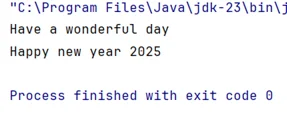
The output of this example is:
We have prepared the files with the above example in the form of code that you can run directly in Java. Download the code for Java Vector.

Related articles