




Java programmer expert


Java HashTable is a data structure that allows you to safely work with data even in multi-threaded applications. Although it is an older but still reliable implementation, its use has specific characteristics. In the following lines, we’ll look at how the HashTable class works, what its advantages and limitations are, and also when it makes sense to use it instead of more modern alternatives such as HashMap.

The HashTable class is one of the older Java implementations of hash tables.
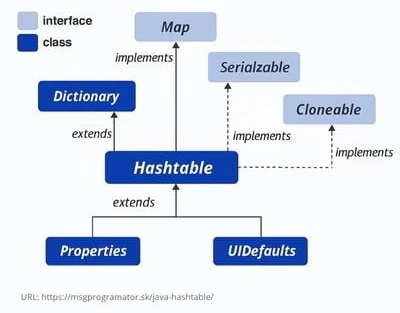
HashTable collection – inheritance hierarchy (source: media.geeksforgeeks.org/wp-content/uploads/20201124183400/HierarchyofHashtable.png)
The HashTable class is an implementation of the Map interface that stores key-value pairs and uses a hash table for fast operations. Each key must be unique and can never be null, nor can the value, so null values are not allowed in HashTable.
Unlike more modern collections like HashMap, HashTable is synchronized, which means it is safe for use in multithreaded applications, but at the same time its operations can be slower.
HashTable uses the hashCode() method of objects to evenly divide pairs into internal “buckets”. This allows to perform adding, searching and deleting operations in constant time (O(1)) with an ideal layout.
To create a HashTable instance, we have several constructors available:
1. Empty HashTable
Creates an empty hash table with default capacity (11) and load factor (0.75).
Hashtable<Integer, String> table = new Hashtable<>();2.HashTable with defined capacity
Creates a new, empty hash table with the specified initial capacity and default load factor (0.75).
Hashtable<Integer, String> table = new Hashtable<>(20);
3. HashTable with defined capacity and load factor
Creates a new, empty hash table with the specified initial capacity and the specified load factor.
Hashtable<Integer, String> table = new Hashtable<>(20, 0.82f);4. HashTable constructed from Map
Creates a new hash table with the same mapping as the given Map.
Hashtable(Map<? extends K,? extends V> t)The Hashtable instance has two parameters that affect its performance: initial capacity and load factor. The capacity is the number of segments in the hashtable, and the initial capacity is simply the capacity at the time the hashtable is created. In the case of the same hash node (called a hash collision), multiple records are stored in a single segment and must be searched sequentially. The load factor indicates how much the hash table can fill up before its capacity is automatically increased.
In general, the default load factor (0.75) offers a good compromise between time and space costs. Higher values reduce the space overhead, but increase the time cost of retrieving a record (which is reflected in most hashtable operations, including get and put). Initial capacity manages the tradeoff between wasted space and the need for repeated operations that are time-consuming.
If the initial capacity is greater than the maximum number of records the hash table will contain divided by its load factor, no rehash operations will ever occur. However, setting the initial capacity too high can waste space. Therefore, when constructing a HashTable, we recommend making the best estimate of how many elements we will store in the collection and choosing the correct initial capacity (and possibly load factor).
If many records are to be created in a hashtable, creating it with a large enough capacity may allow records to be inserted more efficiently than having it perform automatic rehashing as needed to increase the capacity of the table.
A well-designed hash function for objects (hashCode) is extremely important because it is what evenly distributes elements into the correct buckets, reducing the likelihood of collisions and maintaining the efficiency and performance of the collection.
When inserting an element into the collection, its hash value is calculated and the segment where the element should be stored is determined. Of course, this is not enough because two objects with the same hashCode may not be the same, so within the same bucket, objects are compared using the equals() method to ensure the uniqueness of the inserted elements.
Some of the basic operations we can perform with HashTable include:
For a complete overview of the methods of the HashTable class, see official documentation.
HashTable is suitable in the following cases:
On the other hand, if you don’t need synchronization or want a similar collection with higher performance, it is recommended to use HashMap.
HashTable excels at efficiently storing key-value pairs and retrieving them quickly thanks to a hashing method when we need to retrieve and use them. Therefore, hash tables have versatile uses.
Now we will demonstrate this in a program in which we first create a HashTable using the constructor and store in it the states adjacent to Slovakia. After that, we’ll show the use of some basic methods for working with the HashTable.
Main.java
import java.util.Hashtable;
import java.util.Enumeration;
import java.util.Set;

public class Main {
    public static void main(String[] args) {
        // Hashtable creation
        Hashtable<String, String> skNeighbors = new Hashtable<>();

        // Adding country codes and country names
        skNeighbors.put("SK", "Slovakia");
        skNeighbors.put("CZ", "Czech Republic");
        skNeighbors.put("AT", "Austria");
        skNeighbors.put("HU", "Hungary");
        skNeighbors.put("UA", "Ukraine");
        skNeighbors.put("PL", "Poland");

        // Display all country codes and names using Enumeration
        System.out.println("Neighboring states of Slovakia:");
        Enumeration<String> keys = skNeighbors.keys();
        while (keys.hasMoreElements()) {
            String code = keys.nextElement();
            if(!code.equals("SK"))
                System.out.println(code + " - " + skNeighbors.get(code));
        }

        // Lookup a country by its code
        String searchCode = "DE";
        if (skNeighbors.containsKey(searchCode)) {
            System.out.println("\n✅ Country found for code " + searchCode + ": " + skNeighbors.get(searchCode));
        } else {
            System.out.println("\n❌ No country found for code " + searchCode);
        }

        // Display the total number of countries in the directory
        System.out.println("\nTotal number of countries in the Hashtable (before remove): " + skNeighbors.size());

        // Try to remove a country by its code which is not present
        String removeCode = "DE";
        String removedCountry = skNeighbors.remove(removeCode);
        System.out.println("Removed country: " + removeCode + " - " + removedCountry);

        // Try to remove a country by its code
        removeCode = "SK";
        removedCountry = skNeighbors.remove(removeCode);
        System.out.println("Removed country: " + removeCode + " -> " + removedCountry);

        // Check if a specific country exists in the table
        String searchCountry = "Germany";
        if (skNeighbors.containsValue(searchCountry)) {
            System.out.println("✅ " + searchCountry + " is in the directory.");
        } else {
            System.out.println("❌ " + searchCountry + " is NOT in the directory.");
        }

        // Display the total number of countries in the directory
        System.out.println("\nTotal number of countries in the Hashtable (after remove): " + skNeighbors.size());

        // Clear all country entries
        skNeighbors.clear();
        System.out.println("Country directory cleared. Is it empty? " + skNeighbors.isEmpty());

        // Display all remaining countries using keySet()
        System.out.println("Remaining countries after clearing:");
        Set<String> keySet = skNeighbors.keySet();
        for (String code : keySet) {
            System.out.println(code + " - " + skNeighbors.get(code));
        }
    }
}
The output of this example is:
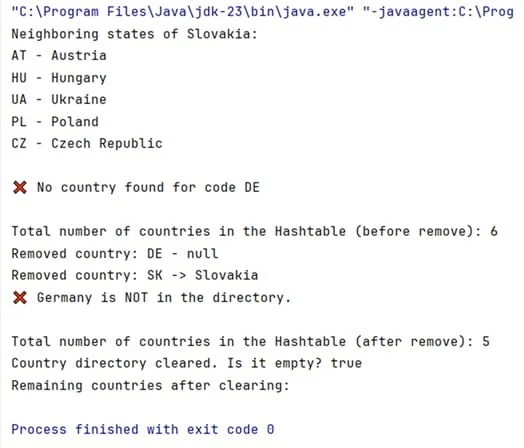
We have prepared the files with the above example in the form of code that you can run directly in Java. Download the Java code for HashTable here.

Related articles